
Tech Tip: Customizing XCAP - Tool Bar
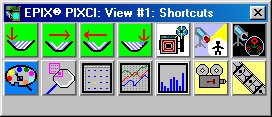
XCAP provides user-defined tool bars of shortcuts, each shortcut represented by an icon which, when clicked, executes a user-specified operation.
The user-defined tool bar is specified by a text file, created with any common editor, which declares:
- The title of the tool bar, the number of shortcuts and their layout (horizontal vs. vertical) within the tool bar.
- For each shortcut:
- The image file containing the shortcut's graphics,
- The script file containing the shortcut's operation(s), and
- A hint which appears when the mouse pointer is over the icon.
Each shortcut's graphics can be any .tif or .bmp file. Such graphics are easily produced by XCAP; by saving a captured image or drawn graphics. The .tif or .bmp file can be of any resolution - the image is automatically resized as necessary to fit.
When a shortcut is clicked, the specified script file is executed. A script file is easily created by using the record feature of XCAP; recording most of the user's interactions with the windows of XCAP. Such a script, for example, can simply activate a desired window, or can implement a sophisticated sequence of operations. The script may "pause and show message to user" which suspends the script's execution, displays instructions and then continues after the user clicks "OK".
Multiple user-defined tool bars can happily co-exist; only memory and disk space limit the number of tool bars, or the number of shortcuts in each tool bar.